The Most Practical Way to Get Started on AWS: Build a Producation Grade Cloud Setup
September 17, 2025
The Most Practical Way to Get Started on AWS: Build a Producation Grade Cloud Setup
When people say ‘learn AWS,’ it’s easy to get lost in a sea of services. In reality, most real-world architectures start with a VPC, subnets, instances, storage, and permissions.
In this guide, we’ll build a secure, production-style setup step-by-step — and we’ll do it four ways:
- AWS Console
- AWS CLI
- Bash Automation Scripts
- Terraform
What You Will Gain After Doing This
- Hands-on experience with core AWS services
- Learn how to automate (CLI, scripts, Terraform)
- Cover security best practices (bastion, private DB, IAM roles, S3 VPC endpoints)
AWS Architecture Diagram
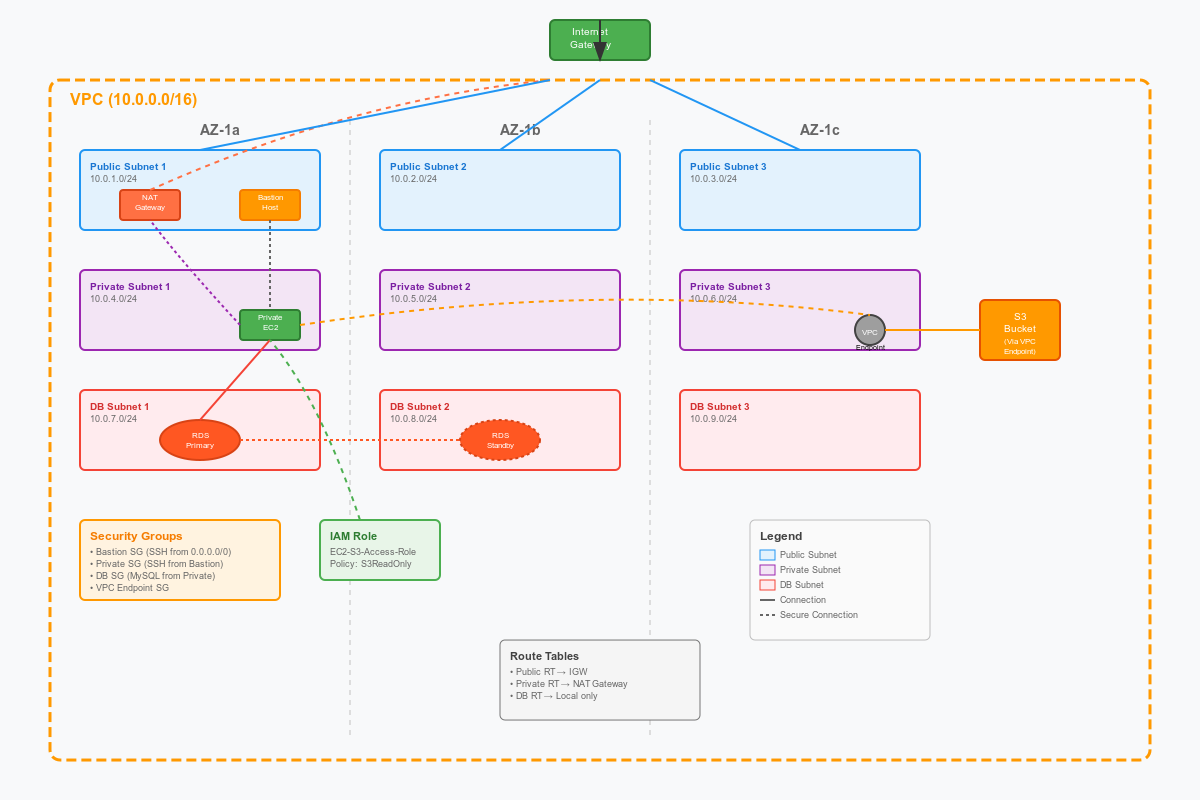
🖼️ What This Architecture Shows
This diagram represents a secure, highly available, multi-AZ VPC that you’d find in a real-world AWS setup.
It’s not a “Hello World” demo — it’s a mini production environment with all the moving parts you’d expect:
- Networking: VPC, public/private/DB subnets across 3 Availability Zones
- Security: Bastion host, security groups, IAM roles, VPC endpoint
- Compute: Public EC2 (Bastion) + Private EC2
- Storage: S3 bucket with VPC endpoint (private access)
- Database: Multi-AZ RDS with primary + standby in private DB subnets
- Routing: Internet Gateway, NAT Gateway, route tables
🛠️ Why Building This Gives You Real-World Hands-On
-
You’ll Design a Real Network Topology
- 3-tier subnets (public, private app, private DB) across multiple AZs — exactly how production networks are built for availability and security.
-
You’ll Practice the Right Security Patterns
- Bastion host for controlled SSH access (no direct SSH to private servers).
- Security groups that only allow specific sources (Bastion → Private EC2, Private EC2 → DB).
- IAM roles for EC2 to access S3 instead of hard-coded credentials.
- S3 VPC Endpoint for private S3 access without exposing to the Internet.
-
You’ll Work With Core AWS Services
- EC2, VPC, Subnets, Security Groups, Route Tables, NAT Gateway, Internet Gateway, RDS, S3, IAM Roles, VPC Endpoints — these are bread-and-butter AWS services.
-
You’ll Learn Multi-AZ High Availability
- Deploying subnets and DBs across multiple AZs shows you how AWS achieves fault tolerance.
-
You’ll Deploy It Four Ways
- AWS Console: You’ll understand each setting and option visually.
- AWS CLI: You’ll get comfortable with automation commands.
- Bash Script + CLI: You’ll learn how to parameterize and repeat deployments.
- Terraform: You’ll practice true Infrastructure as Code, versioning, and repeatability.
This combo is exactly how real production teams work: design + manual console, then automation via CLI, then Infra as Code via Terraform.